Google has quietly made the Pixel 11 Pro‘s HiLight light useful for one more app. WhatsApp messages from a favorite contact now make the light in the camera bar glow — confirmed by Google’s own Pixel product chief on 13 November, days after the November Pixel Drop added the same trick for Google Messages. It is the first time a third-party app’s messages have triggered the light, and it arrives without a word in Google’s official changelog.
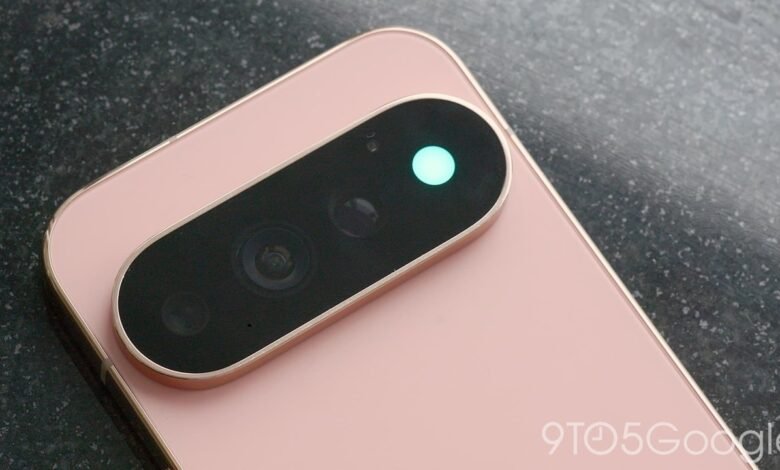
Featured image: the Pixel 11 Pro with HiLight glowing — Image: 9to5Google
At a glance
What HiLight is
HiLight is a small RGB light built into the camera bar of the Pixel 11 Pro, the Pixel 11 Pro XL and the Pixel 11 Pro Fold. Pick a contact, give them a colour, and the light glows in that colour when they reach you — but only while the phone lies face down on a flat surface. It replaced the thermometer sensor that had sat in the same spot since the Pixel 8 Pro, and the standard Pixel 11 does not have it at all.
At launch in August, HiLight did three things: it lit up for calls from favorite contacts, whether on the Phone app or WhatsApp, and it glowed when Gemini was summoned. That was the whole list, and reviewers noticed — the feature felt unfinished three months after launch, with only two first-party apps and WhatsApp calls behind it.
What changed this week
The November Pixel Drop, which started rolling out on 10 November, added the first message support: HiLight now glows when a favorite contact texts you in Google Messages. That much was in Google’s official announcement. What was not in it is the bigger step. On 13 November, Shenaz Zack posted a short video on X confirming that WhatsApp messages trigger the light too — the same favourite-contact colour, the same face-down glow, now for the app most people actually text on.
That makes WhatsApp the first third-party app whose messages work with HiLight, and the second messaging source overall after Google Messages. Google has not described any new setting for it, and reports say there is no separate control to manage WhatsApp messages apart from the existing favourite-contact setup. Google began beta testing message support in September, so this has been coming — it simply arrived without an announcement.
How to get it
What to Watch Next
WhatsApp messages close the biggest gap in HiLight, but the light still covers only a handful of apps. Telegram, Signal and Instagram have no confirmed support, and Google has said nothing about adding them. A third-party app called HiLight Studio already lets any app trigger the light with custom patterns, which shows the demand is there — the question is whether Google opens the feature up itself or leaves it to enthusiasts. This post will be updated if Google confirms more apps.